NodePool context
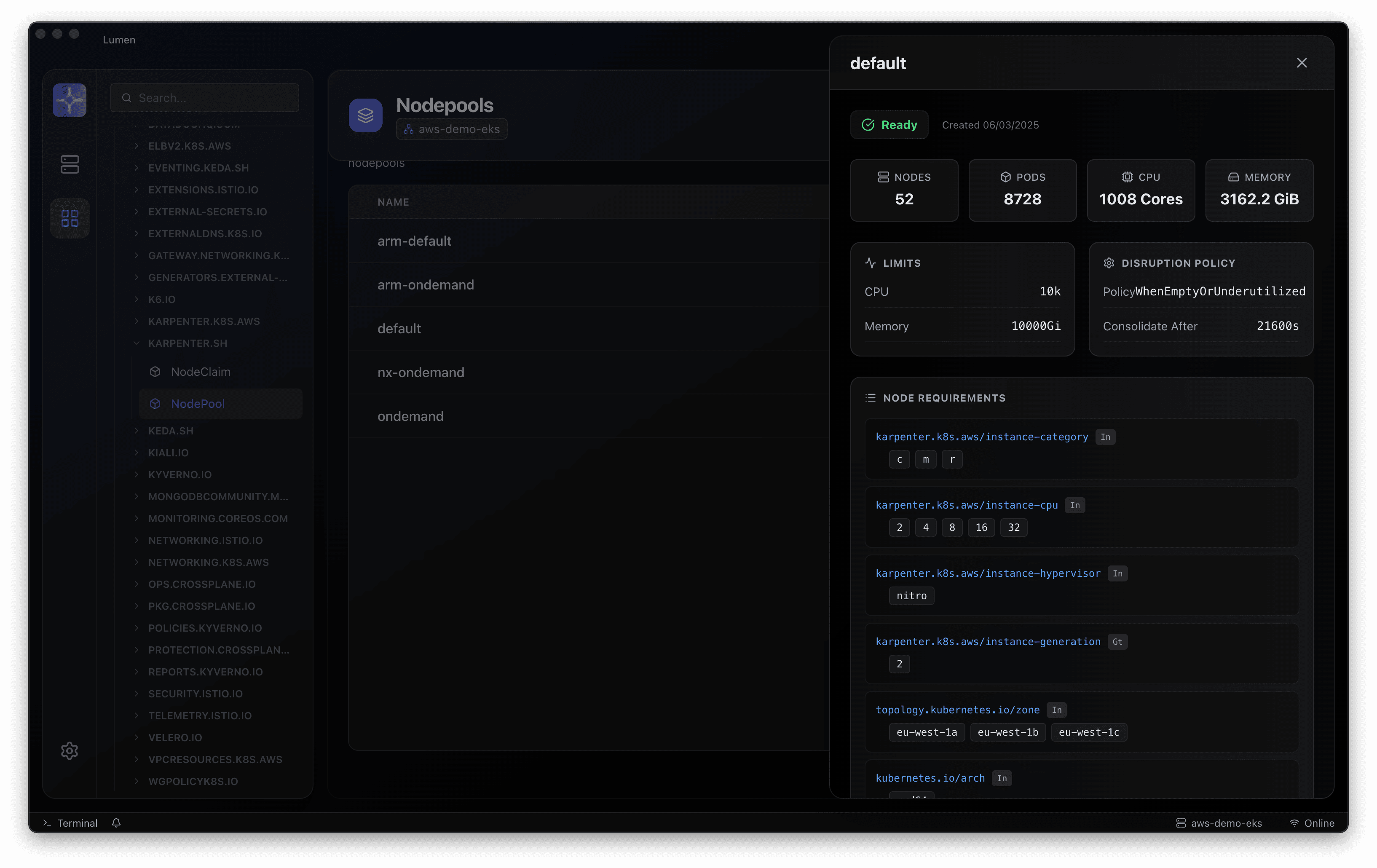
Inspect provisioning configuration and resource relationships to understand the capacity patterns your platform defines.
Lumen / Karpenter visibility
Connect workload demand with the provisioning objects and events around it. Lumen brings Karpenter detail into the Kubernetes workspace so capacity questions stay close to the cluster.
01 / In your workflow
Inspect provisioning configuration and resource relationships to understand the capacity patterns your platform defines.
Move between node resources and workload views to investigate placement and capacity pressure.
Review relevant object state and events before changing provisioning or disruption settings.
02 / A considered investigation
Karpenter controls provisioning. Lumen provides an investigation workspace; changing capacity policies still needs your normal operational review.
Start with your existing kubeconfig. Choose the cluster and namespace before investigating a resource.
Connect resource state with related workloads, events and logs. Build a picture of the issue before changing the system.
Inspect YAML and diffs, confirm the environment and permissions, then apply your team’s normal review and change process.
03 / Team adoption
Choose a representative non-production environment. Confirm resource visibility and credential boundaries, work through your common investigations and document the behaviours you want your team to standardise.
A clearer next step
Choose a release, connect an existing Kubernetes context and work through an investigation your team knows well. Talk to us when you need help with rollout or enterprise adoption.